S-parameters Analysis via scikit-rf
The library scikit-rf is an open source Python package for RF/microwave
engineering, including a powerful set of features for plotting, circuit
analysis, calibration, reading and writing data.
Install and Import
One can install it via pip3 in your home directory (or another venv
environment you prefer):
pip3 install scikit-rf
Once installed, import the library:
import skrf
scikit-rf comes with a matplotlib chart theme with a modern look-and-feel.
Before using the library to do anything, one may call stylely() to
globally apply this theme. This affects all matplotlib charts, so you may
want to borrow it in other unrelated projects:
skrf.stylely()
Plot Smith Charts
The basic entity in scikit-rf is a skrf.Network, representing an
n-port network defined by an S-parameter. This object can be constructed
directly via the path to a Touchstone file:
network = skrf.Network(s2ppath)
Now let’s plot the complex reflections coefficient \(S_{11}\) on
the Smith chart, the most important chart ever invented in RF/microwave
engineering. This chart makes it easier to interpret the phase angle in
the reflection coefficient and impedance by visually showing whether the
the DUT is resistive, capacitive, or inductive. To do so in scikit-rf,
use the plot_s_smith() method of the Network object:
network.plot_s_smith()
plt.show()
By default, all S-parameters are plotted.
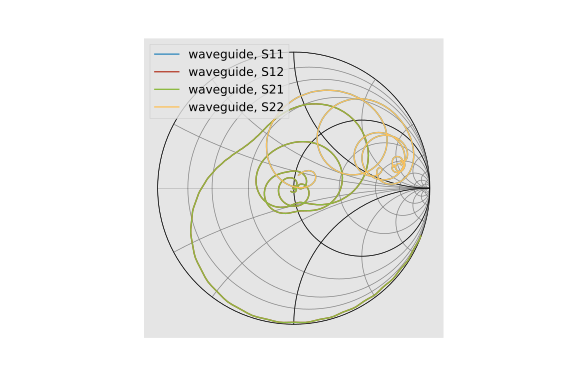
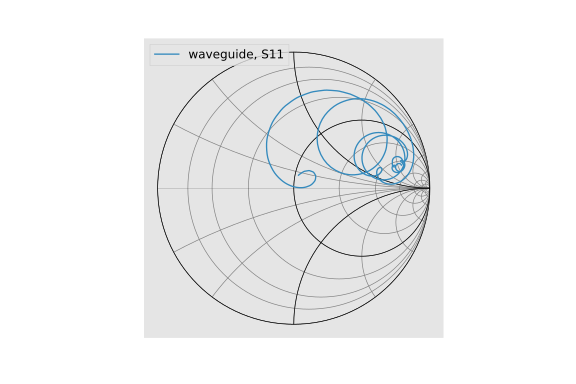
But it makes little sense to plot non-reflection parameters, so we specify
two optional parameters m and n. To plot \(S_{11}\) only, use:
network.plot_s_smith(m=0, n=0)
plt.show()
As we can see from the chart, the input impedence of the DUT is inductive. This is likely due to the mismatches of both the electrical impedance and the physical geometry of the excitation and termination ports at the abrupt transition from the port to the waveguide.
An alternative way to plot \(S_{11}\) is to create a 1-port network
by extracting it from a multi-port network, using the s11 attribute
(or s21, s22, etc). But note that doing this would create a new 1-port
network, so all charts will be labeled S11 regardless of the parameter
plotted. Hence plotting a sliced network is not recommended:
network.s11.plot_s_smith()
plt.show()
Plot Magnitude-Phase Charts
We can also plot other familiar charts via scikit-rf automatically, such
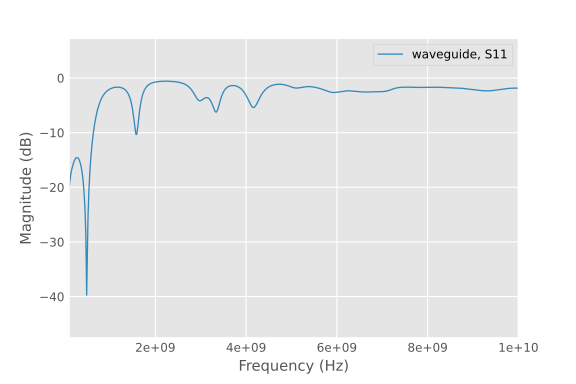
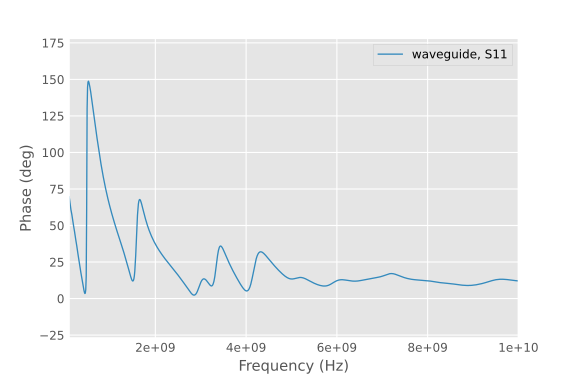
as the scalar \(S_{11}\) plot in decibels and phase angles. This is
much faster than the manual method using only two lines of code for each chart:
network.plot_s_db(m=0, n=0)
plt.show()

network.plot_s_deg(m=0, n=0)
plt.show()
The data is identical to manual plotting, but without the need to do any calculations. All is derived from S-parameters by scikit-rf automatically.
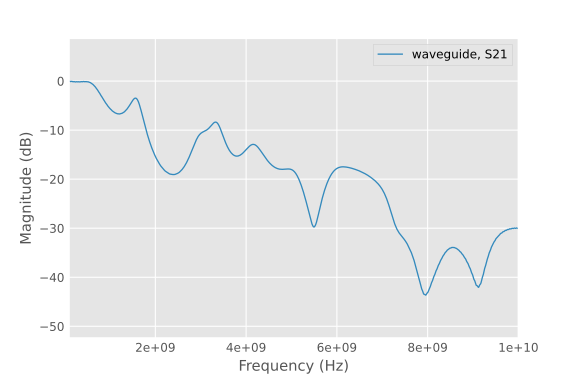
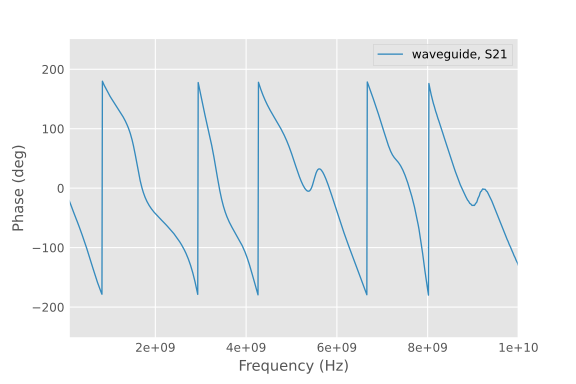
Likewise, to plot \(S_{21}\) using the same method:
network.plot_s_db(m=1, n=0)
plt.show()

network.plot_s_deg(m=1, n=0)
plt.show()
Plot Impedance Chart
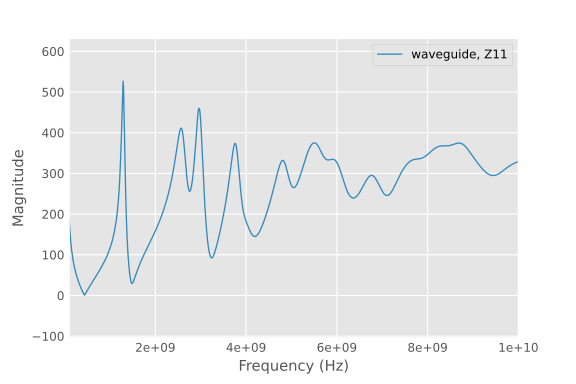
scikit-rf also provides several routines to plot Z-parameters charts, such as the scalar impedance:
network.plot_z_mag(m=0, n=0)
plt.show()
Time Domain Reflectometry
And now for something completely different: going from the frequency
domain back to the time domain. By applying an inverse Fourier transform
to the existing S-parameters (without needing to run new FDTD simulations),
scikit-rf can directly calculate the DUT’s equivalent transient
impulse and step impedance from \(S_{11}\). This enables capturing
impedance discontinuities that are difficult if not impossible to
identify using the Smith chart alone:
# TDR requires the DC component to be physical
network_dc = network.extrapolate_to_dc(kind='linear')

plt.figure()
plt.title("Time Domain Reflectometry - Step")
network_dc.s11.plot_z_time_step(window='hamming', label="impedance")
plt.xlim([-1, 2])  # look at the first two nanoseconds
plt.show()

plt.figure()
plt.title("Time Domain Reflectometry - Impulse")
network_dc.s11.plot_z_time_impulse(window='hamming', label="impedance")
plt.xlim([-1, 2])  # look at the first two nanoseconds
plt.show()
The calculated TDR plot with step excitation shows a strong reflection at an instantaneous impedance of 140 Ω, followed by another reflection of 70 Ω one nanoseconds later (the impulse excitation TDR plot is also included here for completeness).
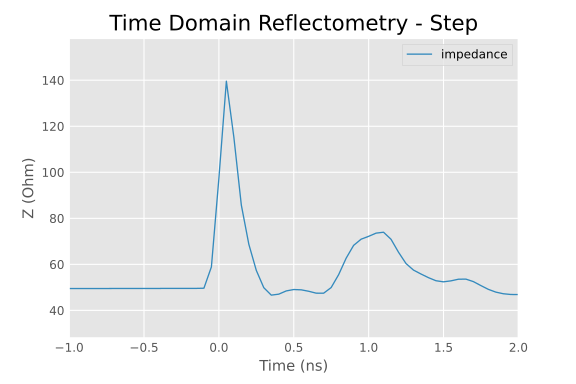
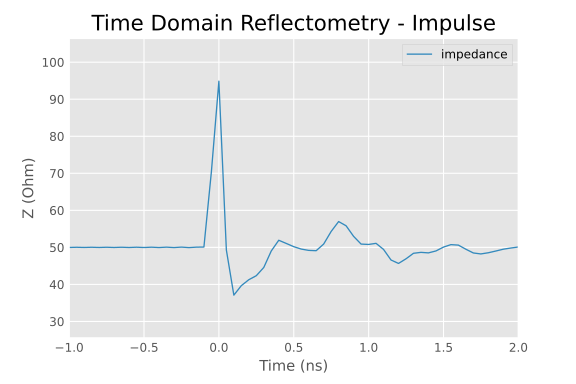
This clearly indicates both ports exhibit discontinuities due to impedance and geometry mismatches, as the lumped port impedance differs from the waveguide’s characteristic impedance.
In transmission line characterization, one should address such mismatches by improving the simulation setup via better port transitions. However, in this simulation, the mismatches are intentionally introduced to demonstrate openEMS’s ability to accurately model real-world effects.
See also
The features introduced in this manual are only the tip of the iceberg, it’s not possible to cover all of its aspects here. See the full manual [12]_ for usage. Here we mention three important use cases.
Calibration and de-embedding. If a port mismatch is unavoidable, post-processing techniques commonly used in Vector Network Analyzers can be applied to openEMS simulations as well, such as the SOLT calibration algorithm, or the newer IEEE P370 de-embedding algorithm. This involves making additional measurements (simulations) with known loads or structures at the port, so that the port or the test fixture’s influence can be solved and removed. See [15]_ [16]_.
Time-gating. An alternative possibility is working in the time domain using the equivalent TDR responses. If we transform the measured S-parameters into a TDR plot, a time gate can be applied that focuses on the response of only the DUT without the early and late reflections by the ports. This gated waveform can then be transformed back to the frequency domain to “clean” our S-parameters. This is not a rigorous solution in comparison to applying proper calibration algorithms, but is a quick-and-dirty solution. See [17]_.
Passivity and causality. For time-domain simulations using S-parameters, the measured data must satisfy two criteria. The DUT itself must not amplify the input signal, violating energy conservation (passivity). The DUT must also not generate an output signal before an input signal arrives, violating the arrow of time (causality). Unfortunately, apparent perpetual motion machines and time machines are often created when S-parameters from measurements or simulations contain artifacts and noise, resulting in unphysical time-domain responses. This necessitates data quality checks and post-processing if violations are found. See [18]_ [19]_ [20]_.