Mesh
A mesh partitions the continuous 3D box into discrete rectangular cuboids, called Yee cells. Yee cells are the basic unit in the computation of electromagnetic field. The mesh quality is crucial for simulation correctness, accuracy and performance.
Coordinate System
Cartesian
By default, openEMS uses the standard Cartesian mesh in conventional FDTD algorithm. A non-uniform mesh is supported as an improvement to save computational resources, by allowing the use of fine mesh sizes only around small features in the structure.
Cylindrical
As an extension the FDTD algorithm, openEMS also supports meshing in cylindrical coordinates. The is useful for simulating round structures without the “staircasing” error. The cylindrical mesh can be uniform or non-uniform, however, the cylindrical mesh system also creates a unique problem for FDTD - the origin is a coordinate singularity. At a fixed angular resolution, all cells near the origin becomes progressively smaller. Therefore, openEMS also has a special feature called “subgridding” to reduce the angular resolution by dropping half of the azimuthal mesh lines within one or multiple given radii.
Both features help achieving resource-saving benefits in cylindrical coordinate simulations, similar to the non-uniform Cartesian mesh. As a showcase, an antenna for medical Magnetic Resonances Imaging (MRI) has been successfully simulated this way in a research project.
Create a Mesh
Obtain the Mesh Object
To create a mesh, use the GetGrid()
method to obtain the mesh object:
# Python
import CSXCAD
csx = CSXCAD.ContinuousStructure()
mesh = csx.GetGrid()
Unit of Measurement
All CSXCAD primitives such as lines, planes or solids are
created using unitless numerical coordinates, without specifying
their physical unit of measurements. To use a model meaningfully,
a dimensionless model must be associated with a physical unit of
measurement, which is achieved by assign a physical unit to the mesh
via SetDeltaUnit():
unit = 1e-3  # in this example, use 1 mm as the unit
mesh.SetDeltaUnit(unit)
By default, the mesh coordinates have a physical unit of meter. This is rarely desirable since most 3D models for RF devices are drawn in millimeters or micrometers.
Important
In some transmission line solvers, the unit of measurement is arbitrary as long as the correct ratio is preserved. However, this is not true for full-wave electromagnetic simulations: a signal’s frequency, speed, and wavelength are related to each other. If an incorrect physical unit is used for the mesh, simulation initialization failures or numerical problems may be encountered by accidentally simulating a structure 1000x larger than the intended wavelength.
Requirements
In general, the mesh must satisfy four requirements:
Frequency Resolution. Its interval must be small enough to resolve the shortest wavelength (highest frequency component) of the signal, so that electromagnetic field details are not missed. Thus, we need several cells per wavelength.
Spatial Resolution. Its interval must be small enough to resolve the shapes of the simulated structure, so that small details of the structure are not missed. Thus, we need at least a few cells around the important shapes (such as a metal trace) of the structure. openEMS uses a rectilinear mesh with variable spacing. To save time, only use a fine mesh interval around details on a structure; use a coarse mesh for the rest.
Smoothness. Its interval should change smoothly, not by a sudden jump. It’s recommended that the mesh spacing vary by no more than a factor of 1.5 between adjacent lines.
1/3-2/3 Rule. The edges of a conductor have singularities with strong electric field. To improve FDTD accuracy, ideally, around the metal edge, the metal should occupy 1/3 of a cell, while the vacuum or insulator occupies 2/3 of a cell. More on that later.
In addition of the algorithmic requirements, a mesh should also satisfy the following technical requirements on alignments.
Zero Thickness Plane Alignment. Zero-thickness 2D objects including metal plates (
AddMetal()) and Thin Conducting Sheet (AddConductingSheet()) must align to an exact mesh line, otherwise these objects can’t be simulated and will be ignored by the simulator.Port Alignment. On each axis, a port must either be one-dimensional and aligned to a mesh line, or two-dimensional and crosses (or overlaps) with two mesh lines (a single mesh cell). Otherwise it can’t be simulated.
Mesh Resolution
As a rule of thumb, we want a mesh resolution of at least:
Note
This is the same “1/10 wavelength” rule of thumb used for determining whether transmission line effects are significant in a distributed circuit.
The relationship between wavelength and frequency is:
in which \(\lambda\) is the wavelength of the electromagnetic wave in meters, \(v\) is the speed of light in a medium, in meters per second, and \(f_\mathrm{max}\) is the highest frequency component of the signals used in simulation.
The speed of light in a medium is given by:
in which \(c_0\) is the speed of light in vacuum, \(\epsilon_r\) is the relative permittivity of the medium (in engineering, it’s sometimes also denoted as a material’s dielectric constant \(D_k = \epsilon_r\)). The \(\mu_r\) term is the medium’s relative permeability, which is usually omitted in engineering for the purpose of signal transmission. Most dielectrics (like plastics or fiberglass) in cables are non-magnetic - unless one is dealing with inductors or circulators.
In vacuum, \(\epsilon_r = 1\) and \(\mu_r = 1\) exactly.
According to the above rule of thumb, the mesh line spacing can be calculated as a function of frequency, permittivity, and permeability. It’s only a rule of thumb, potentially, a finer mesh line interval is needed to increase the spatial resolution around important structures, a coarser mesh line interval may be desirable to increase simulation speed around unimportant regions:
import math
from openEMS.physical_constants import C0

# in this example, use 1 mm as the unit
unit = 1e-3

# highest excitation signal frequency
f_max = 10e9
epsilon_r = 1
mu_r = 1
v = C0 / math.sqrt(epsilon_r * mu_r)
wavelength = v / f_max / unit
res = wavelength / 10
1/3-2/3 Rule
In FDTD, a fundamental error source is the singularities around metal edges, which have strong electric fields that are difficult to calculate properly. As long as the mesh line and metal edge are aligned exactly, the simulation accuracy is degraded unnecessarily - increasing the mesh resolution is inefficient and ineffective. It’s wasteful and only has a marginal effect.
To mitigate this technical limitation, the mesh should be intentionally misaligned with metal edges. For the best results, we introduce additional cells with different sizes around the edge, creating a non-uniform rectilinear mesh with variable spacing. Around the metal edge, the metal occupies 1/3 of a cell, while the vacuum or insulator occupies 2/3 of a cell. This is known as the 1/3-2/3 rule.
Smoothing Problem and Workaround
The interval between the 1/3 and 2/3 mesh lines (i.e. the length of the
cell) is highres, which is smaller than the base interval res by a
factor of 1.5. This is a workaround: If the same mesh resolution is
used for all cells, when we later smooth the mesh,
SmoothMeshLines() may add additional mesh
lines within our handcrafted cells, effectively undoing the 1/3-2/3 rule.
Using the highres interval works around the problem, since
SmoothMeshLines() is not allowed to
subdivide an interval smaller than res. A factor of 1.5 is recommended.
Todo
Explain other workarounds, such as creating all lines manually.
Courant-Friedrichs-Lewy (CFL) Criterion
In general, the CFL criterion governs the stability of FDTD calculations. It states that the simulation timestep can’t be larger than:
where \(v\) is the wave speed, \(\Delta x\), \(\Delta y\), \(\Delta z\) are the distances between mesh lines.
This creates a peculiar limitation: to resolve the smallest mesh cell, one must use a small timestep regardless of frequency.
Even for simulations at low frequencies, as long as the simulated structure has small features (i.e. mesh distance is short), we must use very small timesteps, advancing the simulation only a few nanoseconds per iteration. Under 100 MHz, at the bottom of the VHF band or in the HF band, the required number of iterations becomes impractically large. This means openEMS (and other textbook FDTD solvers with explicit timestepping) is unsuitable if there’s a large mismatch between the signal wavelength and the physical size of the structure, such as a 10 cm circuit board operating at 1 MHz, where the wavelength is 300 m in vacuum.
Note
In openEMS, you only need to define an appropriate mesh. There’s no need to calculate the required timestep size, By default, openEMS uses a modified timestep criterion named Rennings2 (not CFL) to improve timestep selection in non-uniform meshes. But the general limitation still applies.
Rennings2 is derived in an unpublished PhD thesis [1] (not available online). For an abridged description, see research publication [2].
If you really need small cells (e.g. to resolve important features of your structure) you will have to live with long execution times, or perhaps FDTD is not the right method for your problem. As a workaround, one may also try extracting the circuit parameters using a higher signal frequency, then using those equivalent-circuit parameters in a low-frequency simulation with a general-purpose linear circuit simulator.
See also
To switch the timestep algorithm between CFL and Rennings2,
use SetTimeStepMethod(). To tune a
marginally stable simulation, timestep can be reduced manually
via SetTimeStepFactor().
Yee cells
In the Finite-Difference Time-Domain (FDTD) algorithm, the continuous 3D box is partitioned into cuboids in the 3D space. They form the basic unit of electromagnetic calculations. These cells are known as Yee cells (named after Kane S. Yee’s 1966 algorithm).
Since the Yee cells are created in a unique “staggered” arrangement at the heart of the algorithm, they have some unintuitive properties, which are responsible for sampling artifacts. They must be understood to use FDTD successfully for simulations at intermediate and advanced levels.
For simplicity, let’s consider the FDTD algorithm along a 1D line [3]. The 1D line is discretized into two meshes: the electric and the magnetic field meshes. The electric mesh is also known as the primary mesh, the magnetic mesh is known as the secondary mesh (or dual mesh).
Internally, these fields are stored in two separate 1D arrays in
a computer. Each array element is indexed by the computer as E[0],
E[1], E[2], E[3] …, and H[0], H[1], H[2],
H[3], …
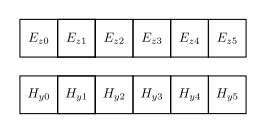
Internal representation of the Yee mesh in a computer.
But the physical meaning of these values is different from their indices.
Physically, they represent an implicit single array. In this array, all
E[idx] elements represent the exact electric field value located exactly
at a mesh line, such as x = 0 and x = 1. On the other hand,
each H[idx] element represents the field value in the middle of two
neighboring E mesh lines. The element H[0] represents x = 0.5
between E[0] (x = 0) and E[1] (x = 1), not x = 1.0.
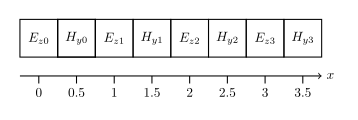
Physical interpretation of the meaning of both meshes. They implicitly represent a single staggered mesh, where the primary mesh computes the electric field at exactly a mesh line, while the secondary grid computes the magnetic field between two neighboring mesh lines. Note that the electric and magnetic fields are vectors orthogonal to each other (right-hand rule).
2D and 3D Yee cells follow the same arrangement, and are constructed
by generalizing all arrays to 2 and 3 dimensions, forming two nested
grids (“staggered grids”) in space. All numerical values are also
generalized to 2 or 3 components (i.e. for all (i, j, k) there
exists Ex, Ey, Ez).
This staggered grid is Yee’s key insight that enables a straightforward leapfrog method to simulate the Maxwell’s curl equations, by computing the left-hand side from the right-hand side.
By numerically differentiating the two neighboring electric cells, the magnetic cell is re-calculated to the next step, and vice versa. This process is called time-marching, because every update moves the simulation forward in time.
Sampling Artifacts
The staggered grid of FDTD is a powerful solution, but with the peculiar feature that the magnetic field is never known exactly at the same point in space or time as the electric field, it always lags by a half-interval, which is responsible to the following limitations.
When using raw voltage or current probes, or running field dumps, users must be aware which placement strategy or interpolation method is used.
Spatial Artifacts
Only the electric field is known at an exact mesh line. The magnetic field
cell is known at a position with a half-step offset (x + 0.5). It’s
located in the middle of the two mesh lines. All mesh lines, coordinates, and
CSXCAD visualization are based on the primary mesh. Current probes placed at
a mesh line is automatically snapped to the nearest secondary mesh line. Thus,
naive current probe placements create a slight error due to this misalignment.
To reduce this error, place a voltage probe on an exact mesh line (such as
U(x, t)), and two current probes half-way to the left and right of the
voltage probe (such as I(x - dx / 2, t), I(x + dx / 2, t)), and
average both readings in post-processing to interpolate for I(x).
Note
If Port-based excitation are used (for simple use cases), openEMS automatically handles this low-level technical detail by correcting placing the voltage and current probes and performing spatial interpolation.
Temporal Artifacts
Only the electric field is known at an exact timestep, the magnetic field
is known with a half-timestep offset (t + 0.5). When probing both voltages
and currents, or dumping both electric and magnetic fields, users must explicitly
take this simulation artifact into account.
Warning
Since temporal interpolation is unsupported, analyzing both physical quantities at the same timestep is difficult, and best be avoided without a strong FDTD background.